Picamera
基于树莓派和普通 Web 摄像头的 Python 图传监控系统,支持 OpenCV 运动检测和人脸识别。
系统架构
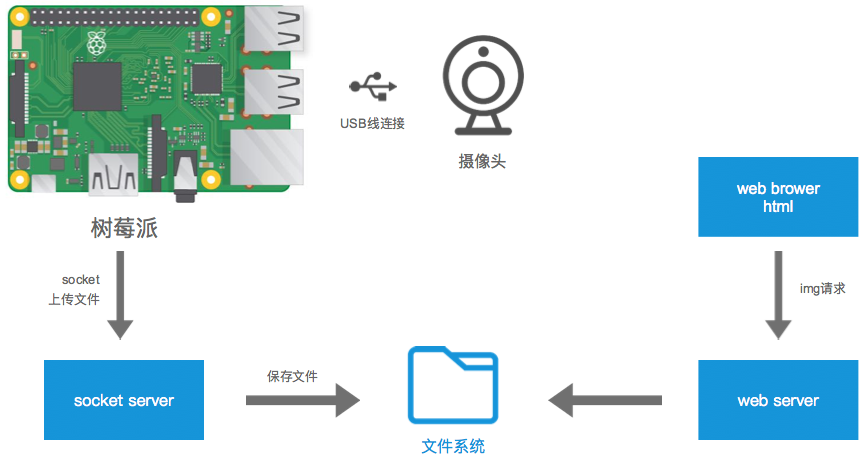
系统由三个部分组成:
| 组件 | 文件 | 运行位置 | 说明 |
|---|---|---|---|
| Socket 客户端 | socket_client.py |
树莓派 | 通过 USB 摄像头采集图像,经 Socket 发送至服务器 |
| TCP 服务器 | server.py |
Linux 服务器 | 接收图像数据,经 OpenCV 检测后保存到磁盘并缓存至内存 |
| HTTP 服务器 | server.py(内嵌) |
Linux 服务器 | 提供标注图片、原始图片和检测结果 JSON 三个端点 |
| 检测模块 | detector.py |
Linux 服务器 | OpenCV 运动检测、人脸检测,可扩展物体识别和目标跟踪 |
检测功能
| 功能 | 方法 | 状态 |
|---|---|---|
| 运动检测 | 帧差法 (cv2.absdiff) + 轮廓检测 |
已实现 |
| 人脸检测 | Haar 级联分类器 (haarcascade_frontalface_default.xml) |
已实现 |
| 物体识别 | MobileNet-SSD(预留接口) | 待实现 |
| 目标跟踪 | KCF/CSRT tracker(预留接口) | 待实现 |
服务器采用双通道架构:同时保存原始图片和标注后图片,并生成结构化 JSON 检测结果。OpenCV 未安装时自动降级为无检测模式,服务器仍可正常运行。
HTTP 端点
| 路径 | Content-Type | 说明 |
|---|---|---|
GET /latest.jpg |
image/jpeg |
标注后的图片(含检测框和标签) |
GET /raw.jpg |
image/jpeg |
原始未标注图片 |
GET /detection.json |
application/json |
检测结果(计数、各检测框坐标、置信度、处理耗时) |
通信协议
客户端与服务器之间使用自定义二进制协议,通过 TCP 端口 10086 通信。
图片上传协议
┌──────────────────── 头部(struct 'IdI')────────────────────┐
│  设备 ID (4B, int)  │  时间戳 (8B, double)  │  文件大小 (4B, uint)  │
└─────────────────────────────────────────────────────────────┘
│                        JPEG 数据流                           │
│                 (每次发送 1024 字节分块)                      │
└─────────────────────────────────────────────────────────────┘
- 服务器收到后保存至
upload/d_{设备ID}.jpg,随即进行 OpenCV 检测处理 - 服务器通过时间戳判断是否为最新图片,拒绝过时数据
- 每设备有独立写锁(
threading.Lock),防止并发写入冲突
快速开始
环境要求
- Python 3.6+
- OpenCV(可选,未安装时检测功能自动禁用)
pip install opencv-python
启动服务器
# 默认监听 0.0.0.0:10086
python server.py

# 自定义地址和端口
python server.py --host 192.168.1.100 --port 8080
发送测试图片
# 发送指定图片
python socket_client.py upload/bbb.jpg

# 自定义服务器地址、端口和设备 ID
python socket_client.py photo.jpg --host 192.168.1.100 --port 8080 --device-id 2
浏览器查看
打开 test_html.html 查看检测监控面板(含标注图片、检测统计、检测详情,每 2 秒自动刷新),或直接访问:
http://127.0.0.1:10086/latest.jpg      # 标注图片
http://127.0.0.1:10086/raw.jpg         # 原始图片
http://127.0.0.1:10086/detection.json  # 检测结果
命令行帮助
python server.py --help
python socket_client.py --help
项目结构
Picamera/
├── server.py           # TCP/HTTP 服务器(接收图片 + 检测 + 多端点服务)
├── detector.py         # OpenCV 检测模块(运动检测、人脸检测)
├── socket_client.py    # Socket 客户端
├── test_html.html      # 浏览器检测监控面板
├── upload/             # 接收到的图片存储目录
└── file/
    └── picamera01.png  # 系统架构图
联系方式
- 文档:https://loadstarcn.github.io/Picamera/
- 邮箱:richard@olive-app.com